Virtual try-on is no longer a novelty. For apparel e-commerce, it is a production problem: you need on-model images fast enough to match launch cycles, you need logos and fabric texture to stay unchanged (brand and product accuracy), and you need the process to be repeatable across SKUs instead of relying on one lucky generation.
Most teams fail not because the model is bad, but because they ask one generation to solve too many constraints at once: pose, body shape, garment drape, identity, lighting, background, styling, and product fidelity.
This article compares the most common virtual try-on model families in 2026 (diffusion-based and classic VITON-style), then turns that into simple selection rules you can actually use.
Scope: as of February 2026. Capabilities and open-source checkpoints evolve quickly; treat this as a decision framework, not a fixed leaderboard.
Quick Answer: Pick by Your Real Bottleneck
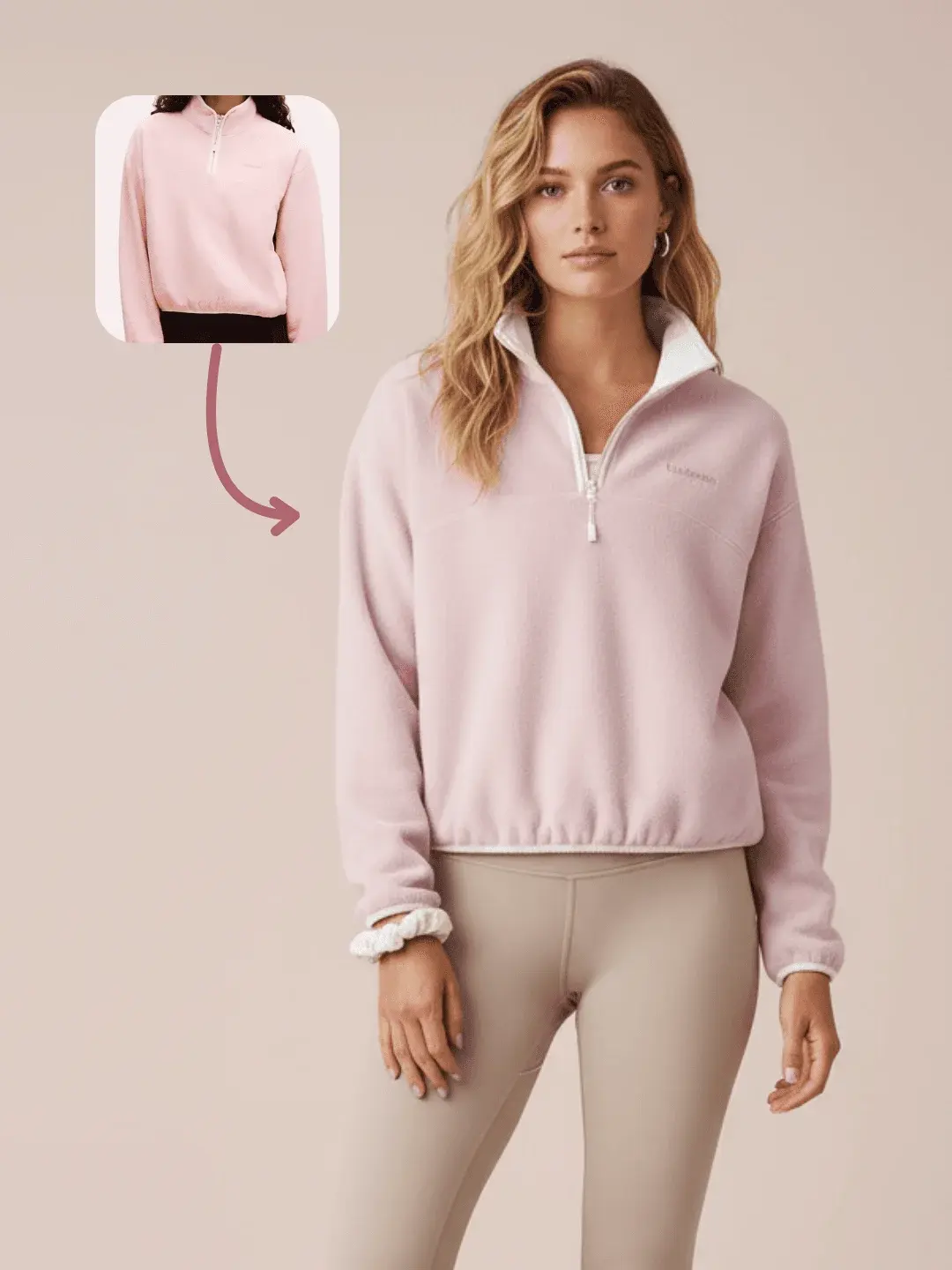
If you mainly need product fidelity (logos, prints, zippers must not change), prioritize pipelines that let you lock garment details and keep composition under control. If your bottleneck is pose realism and drape, diffusion-based try-on usually has a higher ceiling, but it is more sensitive to input quality and masking. If your bottleneck is scaling across many SKUs, model choice matters less than the workflow split: separate clean product from scene direction from final composition so you can rerun only what failed.
Practical rule: A try-on model is only as stable as your inputs. Most model-quality debates are really input-discipline problems.
What Virtual Try-On Really Means (3 Constraints, 1 Output)
You can think of try-on as one output with three non-negotiable constraints: garment fidelity (texture, logo, seams, buttons, structure should not be redrawn), body and pose alignment (sleeves, hem, neckline, waist must match the target pose and proportions), and image realism (lighting, occlusion like hair/hands, and shadows must look physically plausible). When any one of the three fails, the image looks AI-generated immediately, but the business impact differs: fidelity failures risk brand damage, alignment failures can increase returns because fit looks wrong, and realism failures typically show up as lower conversion because the image feels fake.
This is why one-prompt try-on is unstable: it asks the model to optimize all three constraints simultaneously.
Model Families (2026) - Comparison Table
Below is a model-family comparison that stays useful even as individual checkpoints change.
| Model family | Representative examples | Strengths | Weaknesses | Best for |
|---|---|---|---|---|
| Diffusion try-on (image-based) | IDM-VTON, CatVTON | Better realism, more natural drape and lighting | Sensitive to masks + input quality; can rewrite small garment details | Product pages, ads, when realism is priority |
| Classic VITON-style (warping + synthesis) | VITON-HD and VITON variants | Often faster; clearer mental model (warp, then render) | Lower ceiling on realism; can look pasted-on without careful staging | Fast iteration, lower compute, prototyping |
| Video try-on (temporal) | CatV2TON (video virtual try-on) | Can preserve identity/motion across frames | Harder to run; more failure modes; needs stricter control | Short clips, lookbooks, video try-on demos |
Important: these families are not mutually exclusive in production. Many teams use diffusion for the final hero image and faster methods for exploration and pre-selection.
1) IDM-VTON (Diffusion): High Ceiling, Needs Clean Inputs
IDM-VTON is a diffusion-based try-on direction (popularized by research work presented in 2024) optimized for higher realism. In practice, teams reach good results when they treat it like a compositing pipeline: clean garment input, a clear human image with visible pose cues, and stable masking/segmentation. When those inputs are solid, integration is often more natural than classic warping (lighting and garment-body blending feels less pasted-on), and complex poses are handled better than older pipelines.
The tradeoff is that small-detail drift is still a real risk: prints, logos, or fine texture can subtly change if you do not explicitly lock fidelity. It is also sensitive to messy segmentation around hair, hands, and accessories; if the model cannot clearly separate occlusion from garment, it tends to hallucinate.
Best for
Commercial on-model images where realism matters more than generating many random variants.
2) CatVTON (Diffusion): Faster Iteration, Strong Baseline
CatVTON is another diffusion try-on approach (2024-era checkpoints) that is popular because it is approachable and often produces decent results quickly.
It is a strong baseline when you want good-enough realism with less setup complexity, and it tends to work well for bulk testing when you already accept that curation is part of the production plan. The limitation is the same one most diffusion try-on methods share: fidelity is not guaranteed. If your product has text, logos, or repeating patterns, you should assume you will still need a workflow layer that stabilizes those details rather than trusting a single run.
Best for
Batch exploration (many SKUs, many poses) where selection is part of the plan.
3) VITON-HD (Classic VITON family): Understandable, Often Faster
VITON-style pipelines (including VITON-HD from the pre-diffusion era) historically separate try-on into explicit steps (segmentation/pose/warping/rendering). That gives you a clearer troubleshooting path, and it can be faster.
The advantage is stage-level controllability: you can often see whether warping or rendering is the problem, and speed/predictability can be useful when you need many drafts quickly. The downside is a lower realism ceiling compared to newer diffusion-based try-on, and pasted-on artifacts show up faster in e-commerce contexts because edge and lighting mismatches are immediately noticeable.
Best for
Rapid prototyping, lower compute environments, and teams that value stage-level controllability.
The Production Problem: Why Teams Still Get Results That Feel Fake
Even with strong models, try-on fails for a few repeatable reasons. Your product input is not compositable (fuzzy edges, background residue, wrinkles hiding key features). Your human image has occlusion (hair, hands, bags cover the garment area, forcing hallucination). Your constraints are not explicit (if you do not clearly say do not change logos or text, the model will redraw them). And you mix fidelity and styling in one generation, which is a real conflict: asking for an editorial look while preserving every stitch often pushes the model to reinterpret details.
The fix is not a better prompt. The fix is separating the variables.
How to Make Virtual Try-On Repeatable (Workflow Approach)
In OpenCreator, we recommend splitting try-on into three controllable stages. Start with product standardization so the garment becomes a clean, reusable asset (clean edges, minimal background residue, and a clear do-not-change constraint for product structure). Then generate a photography brief that describes camera, framing, lighting, and background as executable constraints rather than vibe words. Finally, do the composition step that places the standardized garment onto the model image; if something drifts, you rerun only the stage that failed.
This turns try-on from gacha-style randomness into a reusable pipeline: when something breaks, you rerun only the stage that failed.
If you want a step-by-step breakdown (with examples), start here:
How to create stable AI virtual model try-on images with a reusable workflow, Open the Virtual Try-on template, and Open the Batch Try-on template (multi-model / multi-style production).
Summary: One-Line Picks
| Goal | What to prioritize |
|---|---|
| Maximum realism | Diffusion try-on + strict input discipline |
| Fast drafts | VITON-style pipeline + stage-level debugging |
| Logo / print accuracy | Workflow that locks product fidelity before styling |
| Scale across SKUs | Templates + batching (workflow beats one-off prompts) |
FAQ
Can AI try-on images be used on product pages?
Yes, but only if your pipeline is built for fidelity first. For most brands, the risk is not obvious AI artifacts - it is incorrect logos, incorrect prints, and changed garment structure. Treat try-on as a production workflow with validation, not as a one-off generation.
Why does the logo or print change even when the garment looks right?
Because the model is optimizing for realism, not brand accuracy. If your process does not explicitly lock garment details (and if the input is not clean enough), the model will redraw fine texture as a good-enough approximation.
What inputs lead to the most stable try-on?
Clean product photos (clear details, minimal occlusion) and human photos with clean body visibility. If hair, hands, or accessories cover the garment area, hallucination is unavoidable.
What is the simplest improvement that helps most teams?
Standardize the product first (clean edges + do-not-change constraints), then generate the scene/brief, then compose. In other words: separate fidelity from styling.