.jpg%3FimageMogr2%2Fformat%2Fwebp%7CimageMogr2%2Fquality%2F85%7CimageMogr2%2Fthumbnail%2F1280x720&w=3840&q=75)
Camera control is the difference between “a cool AI clip” and “a usable marketing shot.” Most teams do not fail because the model cannot generate motion. They fail because the camera language never becomes executable. You write “cinematic dolly in,” and the model gives you a new composition but not a dolly. You write “orbit around the product,” and the product morphs as if the camera is moving because the model is rewriting the subject instead of moving a viewpoint. You write “handheld documentary pan,” and you get jitter that feels like artifacts rather than intention.
This post is a production-minded guide to camera movement control in AI video. It is not a list of camera terms. It explains how to translate intent into a shot plan the pipeline can reuse, and why the most reliable path to camera control is to first build a storyboard or multi-camera shot breakdown, then render shots against that plan, and only then generate the final clip.
Scope: as of February 2026. Model behavior and UI entry points change quickly, but the production logic here is stable: separate variables, make camera intention explicit, and turn winning shots into reusable assets.
.jpg?imageMogr2/format/webp|imageMogr2/quality/85)
Quick Answer (The Control Stack That Works)
If you want repeatable camera movement, stop treating camera as a vibe adjective inside one long prompt. Treat it as a control layer. In practice, the most stable stack looks like this: generate a shot plan first (storyboard grid or multi-camera breakdown), render or generate each shot with strict framing constraints, curate and patch the failures, and then generate short clips per shot rather than asking for one perfect 15-second hero take. This feels “less magical,” but it is how you get predictable footage instead of lottery results.
Once you have that stack, camera control becomes something you can reuse. You can keep the same camera grammar across campaigns and swap only inputs: the product, the persona, the location brief.
Why Camera Prompts “Fail” (They Usually Become Composition Requests)
Camera movement in the real world is a geometric constraint. “Dolly in” means the camera physically moves closer while preserving perspective cues. “Pan” means the camera rotates on a fixed point. “Orbit” means the camera circles around the subject with a consistent radius. Generative models, however, often interpret these as aesthetic instructions unless the pipeline is built to enforce them. That is why camera prompts “fail”: the model satisfies the sentence by changing composition, not by obeying movement physics.
In marketing, this matters because camera movement is part of the message. A push-in is a reveal. A slow orbit is a premium product cue. A static close-up is proof. If your camera intention is not executed, the clip might still look nice, but it will not communicate what you intended.
The Five Movements That Cover Most Commercial Use Cases
You do not need a film school vocabulary to ship good AI video. Most commercial use cases collapse into five movements: push-in (dolly in) for reveal and tension, pull-back for context and scale, pan for scanning a feature area, tilt for vertical reveal (from logo to base, from face to outfit), and orbit for premium “hero product” language. The goal is not to memorize terms. The goal is to choose one movement per shot so the model has a single camera job instead of conflicting jobs.
When prompts include multiple movements in one line (“dolly in while orbiting and panning”), the model often produces mush because it cannot satisfy three geometric constraints while also generating subject motion and style. A better production habit is: pick one primary movement, then let subject motion do the rest.
Storyboards Make Camera Executable (Because They Freeze the Frame First)
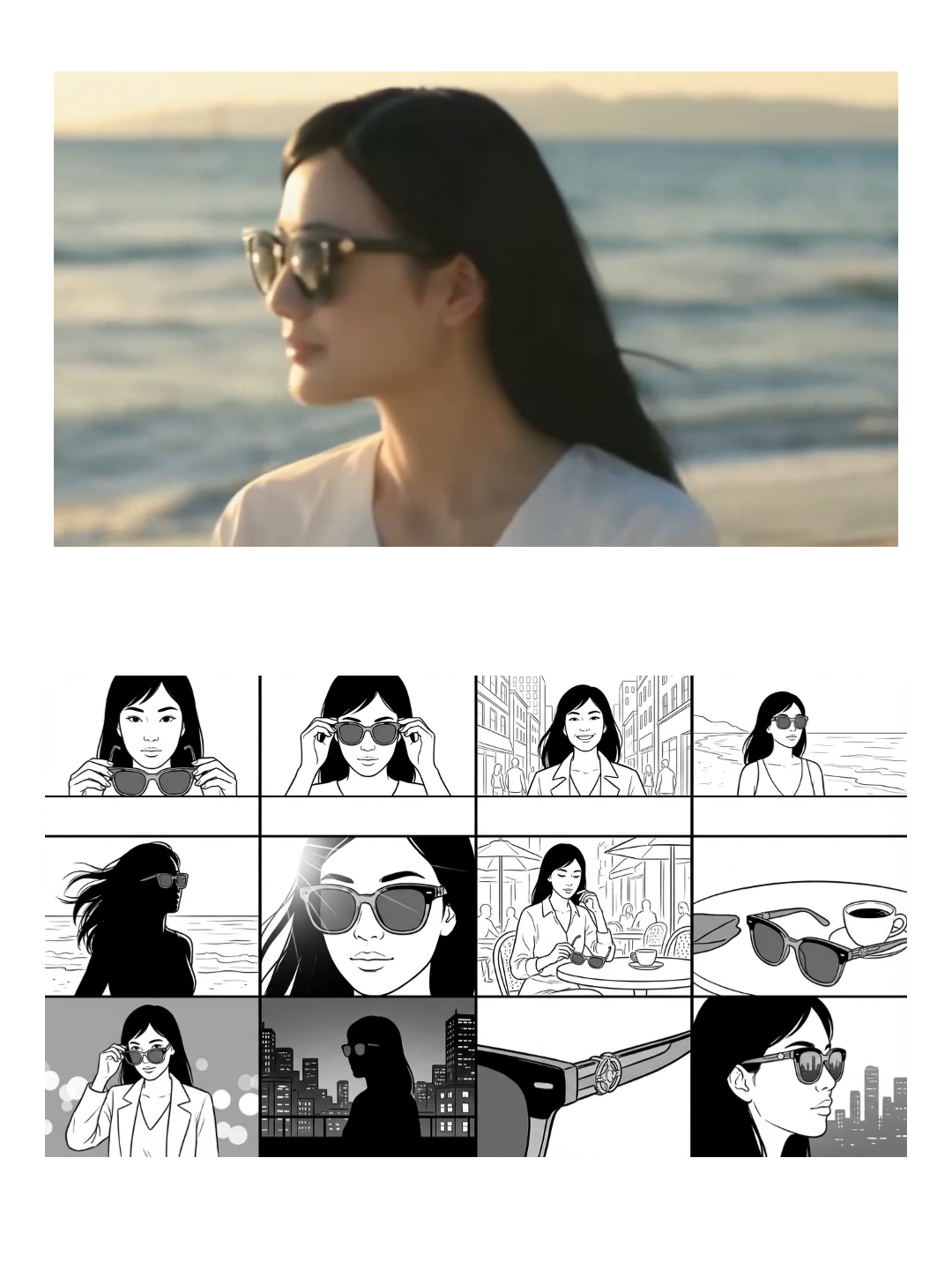
A storyboard is not only a planning tool. In AI workflows, it is a stabilizer. If you generate a multi-camera storyboard first, you freeze the frame language: where the subject sits in the frame, what the “close-up” actually looks like for this product, and which angles remain stable. Then you use the storyboard panels as anchors for short clips. This is how you avoid the common failure where the model gives you “a different shot” every time and you cannot assemble a coherent sequence.
If you want a practical starting point, this is the most directly relevant template:
When you need a full sequence that is designed to translate into an actual generated video, start from a storyboard template that is already meant to become a clip:
How to Build a Reusable Shot Library (So You Stop Rewriting Prompts)
Most teams never get camera control because they treat every video as a one-off. A shot library flips that. Instead of rewriting camera prompts, you standardize a set of shot “atoms” that match your category: a hero orbit, a detail pan, a packaging reveal push-in, a hands-on usage medium shot, and a comparison framing. Once these are fixed, campaigns become input swaps.
This is where workflows matter. The camera movement itself is only one part of production. The repeatable value is everything around it: the same aspect ratio, the same pacing, the same CTA structure, the same export presets. If those are not standardized, even perfect camera motion will not save the weekly process.
If your pipeline is already multi-model (because you switch models by stability vs realism), treat camera control as a shot-level choice. You do not need one model to do everything. You need a workflow that lets you render the right model for the right shot.
Where Camera Control Is Easiest (And Where It Is a Trap)
Camera control is easiest when the subject is simple, the frame is clean, and the motion is slow. Product hero shots with clean backgrounds are far more stable than crowded scenes. It becomes a trap when you expect the model to simultaneously do complex subject motion, complex camera motion, and strict identity preservation. In those cases, the production move is to simplify: make the camera motion simple, and let the subject motion carry the energy, or vice versa.
If you want one practical rule: if the product is the hero, do not let the camera move so aggressively that the model has an excuse to redraw the product. Keep movement slow and intentional, and patch failures shot-by-shot.
FAQ
Why does “orbit around the product” often change the product itself?
Because many models approximate orbit by redrawing the subject from new viewpoints. If the pipeline does not lock identity and geometry, the model “moves the camera” by inventing a similar product from another angle. Workflows reduce this by anchoring the product and isolating viewpoint changes.
Do I need a storyboard for every AI video?
No, but if you care about repeatability, storyboards are the fastest way to freeze camera language. Even a quick multi-camera grid can save more time than writing longer prompts, because it reveals which framings are stable for your subject.
What is the simplest way to improve camera control in practice?
Pick one primary camera movement per shot, keep motion slow, and generate shots as a set you can compare. When something fails, regenerate only that shot rather than restarting the whole clip.